NEWS

iOS 11 Adoption Almost Hits 25% After First Week of Availability

09/26/2017

1971

iOS 11 has been available to the public for just about a week and mixpanel is tracking the adoption of Apple’s latest mobile OS. So far, users aren’t jumping on iOS 11 as quickly as they did iOS 10 last year, but adoption this fall is still relatively strong.
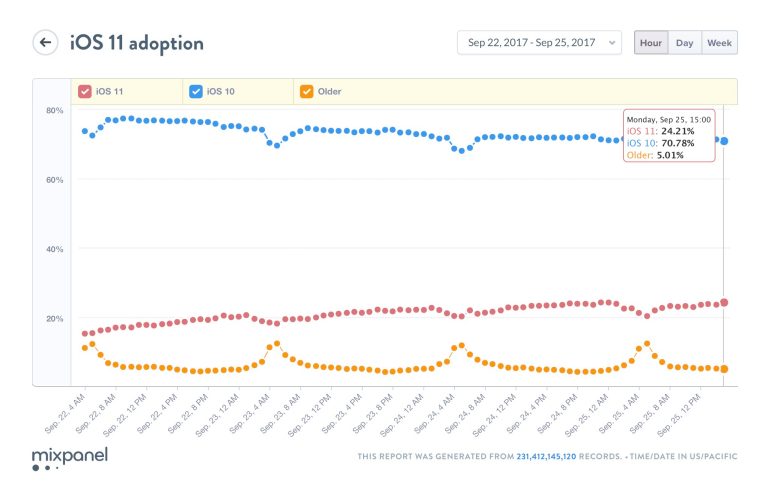
 

iOS 11 Adoption Almost Hits 25% After First Week of Availability


Last year, iOS 10 set the record for reaching installation on two-thirds of devices in just twenty-seven days. It later hit 76% adoption in January, and as of September 6, Apple’s developer page details that 89% of devices were on iOS 10, 9% on iOS 9, with just 2% on earlier versions.


Last year, about a week in, iOS 10 adoption was at about 30%. Today, mixpanel data is showing 24.21%  of devices on iOS 11, 70.78% on iOS 10, with 5.01% on older versions as of 3PM ET.


Last year saw an interesting spike in iOS adoption about two weeks after availability, which could have been caused by early update issues and the release of 10.0.2. iOS 11 has comparatively been a smoother update without any major issues.


Check out our full rundown on everything that’s new in iOS 11.


Source: 9to5mac


Windows
Mac OS
iOS
Linux
3uTools
Win 64-bit For this device
V6.0.1 2024-12-18
Download
Win 32-bit For this device
V6.0.1 2024-12-18
Download
3uTools
Intel Chip How to Identify Chip Type
V6.0.1 2024-12-18
Download
Apple Silicon
V6.0.1 2024-12-18
Download
How to Identify Chip Type
1.  Click the Apple icon in the top-left corner of the screen and select About This Mac.
2.  Check the Processor or Chip field to determine if it is "Intel" or "Apple".
Please use the 3uTools PC client to install the iOS client:
1、 Install either the Windows or Mac version of 3uTools on your computer
2、 Open the PC client and connect your device to the computer via USB cable
3、 After the connection is successful, wait for the computer to automatically install the mobile app for the device, or locate “Install Mobile App” on the computer and manually click to install.
3uTools
deb file
V6.0.1 2024-12-18
Download
rpm file
V6.0.1 2024-12-18
Download
Windows
Windows
iOS
iOS
Android
Android
TV
TV
3uAirPlayer
Win 64-bit For this device
V6.0.1 2024-12-18
Download
Win 32-bit For this device
V6.0.1 2024-12-18
Download
iOS Device Mirroring (No App Required)
1、 Install 3uAirPlayer on the Windows PC
2、 Open Control Center and select Screen Mirroring
3、 From the list, choose your PC to start mirroring
4、 Or connect your iOS device to the PC via USB to begin mirroring
Scan to get "3uAirPlayer" App
3uAirPlayer TV V6.0.1
2024-12-18
TV System Requirements: Android 7.0 or later
Download the TV installation package, copy it to a USB drive, insert it into your TV or set-top box, then select the file from the home screen to install.




