 NEWS
NEWS
Apple Now Offering Free Repairs of 42mm Apple Watch Series 2 Models With Swollen Batteries
 04/16/2018
 2257
2257
Apple will repair select Apple Watch Series 2 models that do not power on or have a swollen battery free of charge as part of a new service policy. 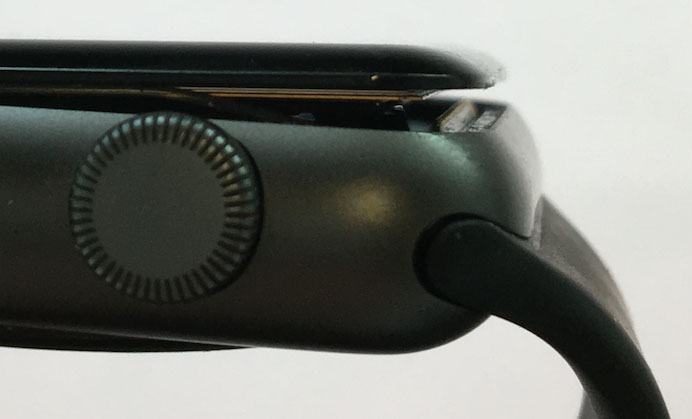
"Apple has determined that under certain conditions, some Apple Watch Series 2 devices may not power on or they may experience an expanded battery," wrote Apple, in an internal document distributed to Apple Stores and Apple Authorized Service Providers on Friday and subsequently obtained by MacRumors.
"Apple will service eligible devices free of charge," according to the document, numbered SN4534 in Apple's internal GSX portal. "Apple will authorize coverage for eligible devices for three years after the original date of purchase."
The policy was issued in at least the United States, Canada, Mexico, and Europe, so it is likely a worldwide initiative where service providers are available.
A swollen battery can prevent an Apple Watch from powering on or cause the display to burst open. Photos of the issue have been shared by customers in the Apple Support Communities and MacRumors forums in recent months, but the majority of the incidents are first-generation models released in 2015.
Eligibility is limited to any 42mm-sized Apple Watch Series 2 models, including Sport, Edition, Hermès, and Nike+ variants, pending a visual-mechanical inspection, according to a companion document numbered OP1977. The warranty status of the Apple Watch does not affect coverage, the document states.
This new policy does not apply to the original Apple Watch, Series 1 and Series 3 models, or any 38mm model. A few years ago, however, Apple enacted a similar policy for original Apple Watch models with swollen or expanded batteries that offers free repairs within three years of the original date of purchase.
Affected customers can visit the Contact Apple Support page, select Apple Watch → Battery, Power, and Charging → Bring in for Repair to schedule an appointment with the Genius Bar at an Apple Store or at an Apple Authorized Service Provider. There are also options to contact Apple advisors by phone or online chat. Battery replacements are completed at an off-site Apple Repair Center.
Apple advises customers inquiring about a refund for a previous Apple Watch Series 2 battery replacement to contact its support advisors.
Apple has not announced this policy publicly as it does with some of its other repair programs, but MacRumors has verified the internal document's authenticity with multiple sources. However, outside of our control, some Apple employees advise customers that no such policy exists. In these cases, our only advice is to keep trying or escalate the case to a senior advisor if possible.
Source: macrumors










