NEWS

Benchmarks Confirm That the iPhone Xr and the Xs Are Almost the Same

11/06/2018

2491

The iPhone Xr is supposed to be one of the best iPhone options that Apple has provided in the last years. It includes many of the features of the most expensive models and more importantly a lower price. Now a recent benchmark test carried out by Macworld gives us very interesting information.
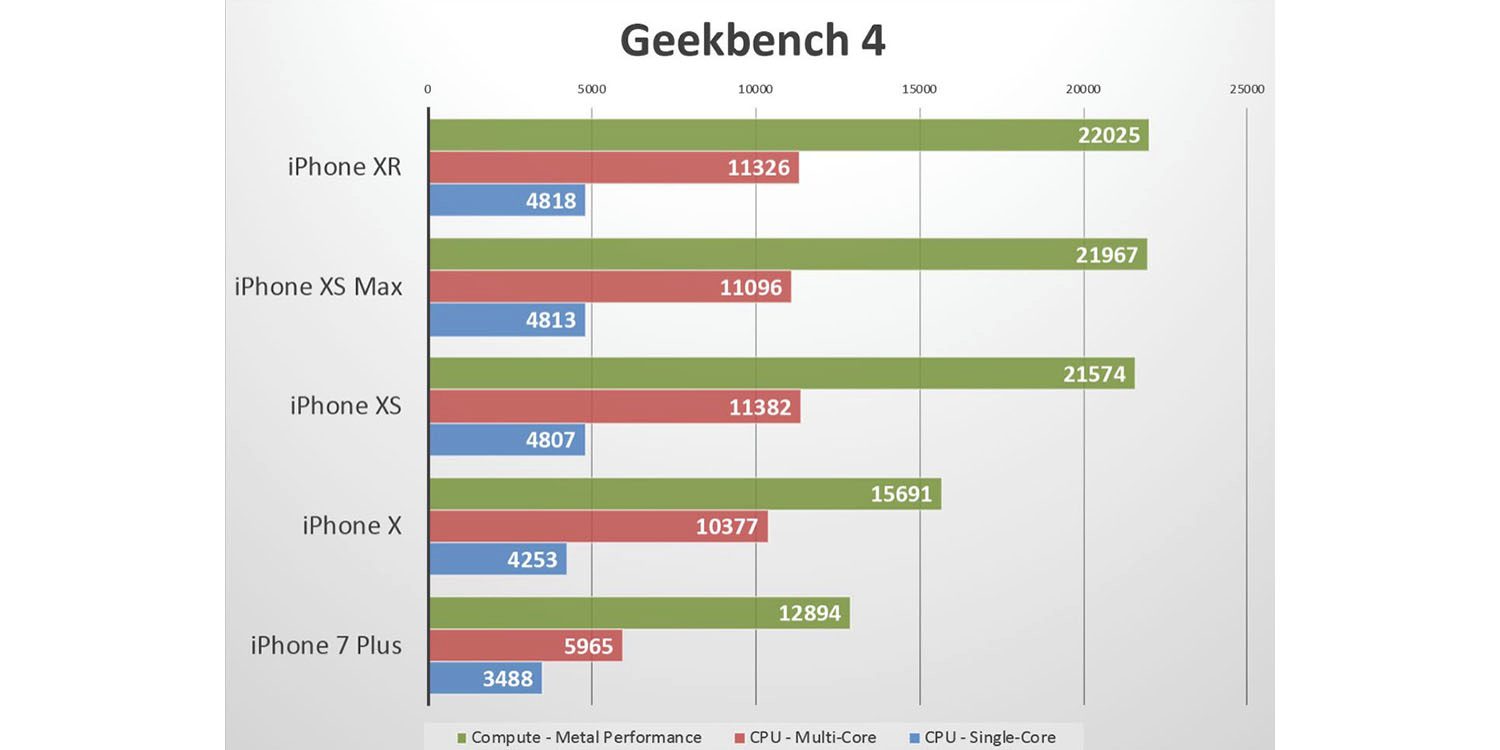

Benchmarks Confirm That the iPhone Xr and the Xs Are Almost the Same


To sum it up, the iPhone Xr offers the same performance upgrades as the Xs in comparison to last year’s iPhone X. Now, the most important thing is that it can even give you a better experience that the more expensive iPhone Xs and Xs Max models. The Xr has better benchmark results since it has a lower resolution display while still having the A12 Bionic Chip and the same amount of RAM as the Xs. Battery life is something else to have in consideration since the iPhone Xr gives you 19 minutes more than the XS Max and from 30 to 45 minutes more than the Xs.


So technically this is all going to narrow down to whether or not you want an OLED display or if you have a couple of extra hundred bucks you want to pay for the more expensive models that don’t necessarily perform better than the iPhone that’s supposed to boost Apple’s sales like no other in these recent years.


Source: pocketnow

Windows
Mac OS
iOS
Linux
3uTools
Win 64-bit For this device
V6.0.1 2024-12-18
Download
Win 32-bit For this device
V6.0.1 2024-12-18
Download
3uTools
Intel Chip How to Identify Chip Type
V6.0.1 2024-12-18
Download
Apple Silicon
V6.0.1 2024-12-18
Download
How to Identify Chip Type
1.  Click the Apple icon in the top-left corner of the screen and select About This Mac.
2.  Check the Processor or Chip field to determine if it is "Intel" or "Apple".
Please use the 3uTools PC client to install the iOS client:
1、 Install either the Windows or Mac version of 3uTools on your computer
2、 Open the PC client and connect your device to the computer via USB cable
3、 After the connection is successful, wait for the computer to automatically install the mobile app for the device, or locate “Install Mobile App” on the computer and manually click to install.
3uTools
deb file
V6.0.1 2024-12-18
Download
rpm file
V6.0.1 2024-12-18
Download
Windows
Windows
iOS
iOS
Android
Android
TV
TV
3uAirPlayer
Win 64-bit For this device
V6.0.1 2024-12-18
Download
Win 32-bit For this device
V6.0.1 2024-12-18
Download
iOS Device Mirroring (No App Required)
1、 Install 3uAirPlayer on the Windows PC
2、 Open Control Center and select Screen Mirroring
3、 From the list, choose your PC to start mirroring
4、 Or connect your iOS device to the PC via USB to begin mirroring
Scan to get "3uAirPlayer" App
3uAirPlayer TV V6.0.1
2024-12-18
TV System Requirements: Android 7.0 or later
Download the TV installation package, copy it to a USB drive, insert it into your TV or set-top box, then select the file from the home screen to install.




