 NEWS
NEWS
Apple's U.S. iPhone User Base Sees Slowing Growth in Q1 2019
 05/17/2019
 2194
2194
Apple's estimated U.S. iPhone installed base saw little growth in the first calendar quarter of (second fiscal quarter) of 2019, according to new data shared today by Consumer Intelligence Research Partners (CIRP).
As of March 30, 2019, the U.S. iPhone use base hit 193 million units, compared to 189 million units at the end of the December quarter, marking two percent growth quarter over quarter.
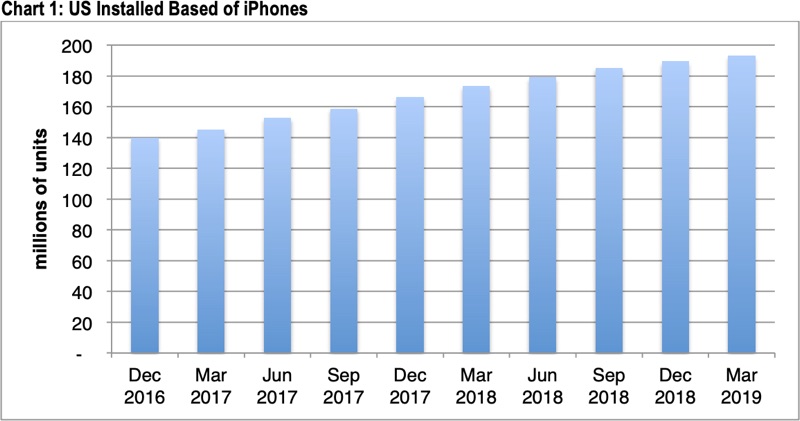
Apple's iPhone user base was at 173 million units at the end of the March 2018 quarter, for year over year growth of 12 percent, which is not bad, but not quite hitting the growth rates of prior years.
A year ago, the installed iPhone user base in the U.S. grew four percent quarter over quarter and 19 percent compared to the prior year, indicating a plateau iPhone user base.
CIRP's estimated U.S. iPhone installed base is based on estimated worldwide iPhone sales of 39 million, calculated from Apple's iPhone revenue and average iPhone selling price for the quarter ending in March 2019.
iPhone sales have slowed down, and in January, the decline in sales over the holiday period led Apple to make the rare move of lowering its expected revenue guidance. Apple also saw a dip in revenue in the second fiscal quarter (first calendar quarter) of 2019, bringing in $58 billion, compared to $61.1 billion in the year-ago quarter.
Apple has never provided a specific breakdown of the number of active devices in the United States, but earlier this year, the company said there were 1.4 billion active devicesaround the world. 900 million of those devices are iPhones.
Source: macrumors










