TUTORIALS

Can I Jailbreak My iPhone, iPad?

02/07/2018

8921

In times gone by, jailbreaks would come in the form of one tool per firmware range. These tools often have different advantages and limitations, and can become hard to differentiate. In this article, we summarized the current tools.


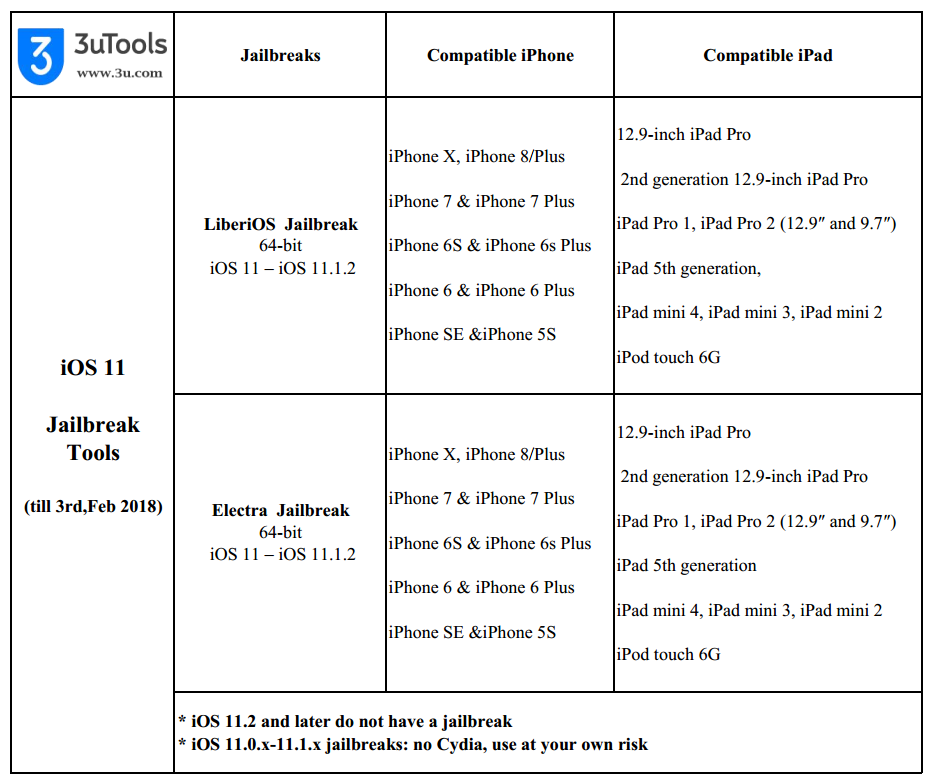
iOS 11.2 and above have no jailbreak. For iOS 11.1.2 and below there are a few things on offer, in various stages of readiness.


iOS 11 – iOS 11.1.2 Jailbreak Status

Can I Jailbreak My iPhone, iPad?


We get a lot of questions about which jailbreak to use for iOS 10, and which one to use to iOS 11. It really depends on your device and iOS version.


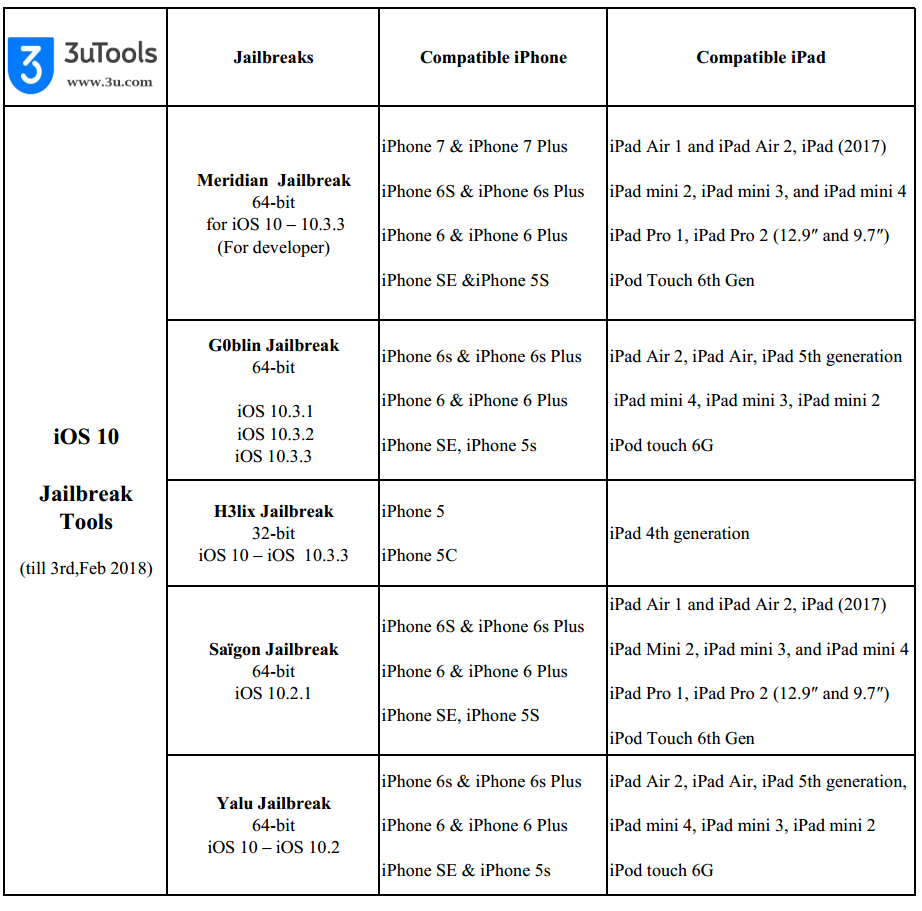
As below, we take a look at the current status of the iOS 10 – iOS 10.3.3 jailbreak so you can take a more informed decision. 


iOS 10 – iOS 10.3.3 Jailbreak Status

Can I Jailbreak My iPhone, iPad?


At this page, you could find all jailbreak tutorials: A Summary of Current Jailbreak Tools


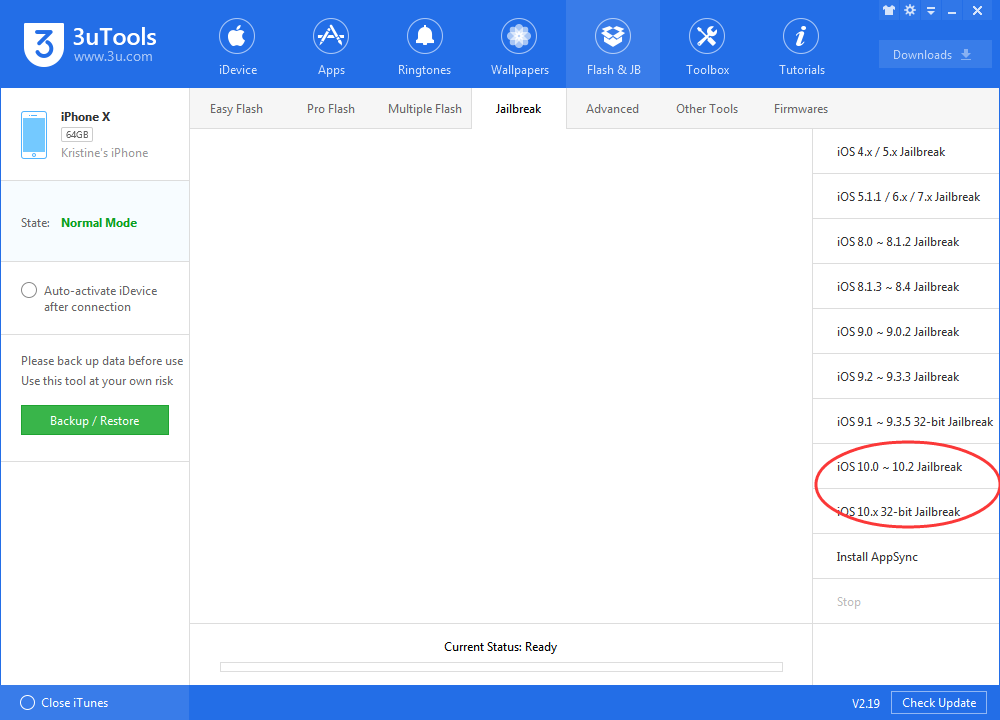
You could try jailbreaks on 3uTookls, we have updated iOS 10-10.2 Yalu jailbreak and H3lix jailbreak into 3uTools section, as below:

Can I Jailbreak My iPhone, iPad?


More jailbreak info and iOS tips could be found on 3uTools website.

Windows
Mac OS
iOS
Linux
3uTools
Win 64-bit For this device
V6.0.1 2024-12-18
Download
Win 32-bit For this device
V6.0.1 2024-12-18
Download
3uTools
Intel Chip How to Identify Chip Type
V6.0.1 2024-12-18
Download
Apple Silicon
V6.0.1 2024-12-18
Download
How to Identify Chip Type
1.  Click the Apple icon in the top-left corner of the screen and select About This Mac.
2.  Check the Processor or Chip field to determine if it is "Intel" or "Apple".
Please use the 3uTools PC client to install the iOS client:
1、 Install either the Windows or Mac version of 3uTools on your computer
2、 Open the PC client and connect your device to the computer via USB cable
3、 After the connection is successful, wait for the computer to automatically install the mobile app for the device, or locate “Install Mobile App” on the computer and manually click to install.
3uTools
deb file
V6.0.1 2024-12-18
Download
rpm file
V6.0.1 2024-12-18
Download
Windows
Windows
iOS
iOS
Android
Android
TV
TV
3uAirPlayer
Win 64-bit For this device
V6.0.1 2024-12-18
Download
Win 32-bit For this device
V6.0.1 2024-12-18
Download
iOS Device Mirroring (No App Required)
1、 Install 3uAirPlayer on the Windows PC
2、 Open Control Center and select Screen Mirroring
3、 From the list, choose your PC to start mirroring
4、 Or connect your iOS device to the PC via USB to begin mirroring
Scan to get "3uAirPlayer" App
3uAirPlayer TV V6.0.1
2024-12-18
TV System Requirements: Android 7.0 or later
Download the TV installation package, copy it to a USB drive, insert it into your TV or set-top box, then select the file from the home screen to install.




