NEWS

Apple Promo Donates $1 to World Wildlife Fund For Each Apple Pay

04/21/2017

2810

Apple on Thursday launched an Earth Day-related charity promotion promising to donate $1 to the World Wildlife Fund for each purchase made at its stores using Apple Pay.

The event runs from today through April 28. Significantly, Apple's donation doesn't increase with higher-cost products — the company is donating the same dollar even when buying a top-end $2,799 MacBook Pro.

The World Wildlife Fund has been a regular Apple charity partner, particularly for Earth Day. Last year an "Apps for Earth" campaign on the App Store 
pulled in over $8 million.
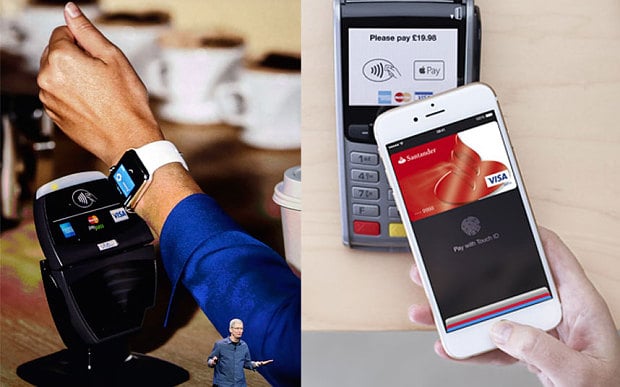
Apple Promo Donates $1 to World Wildlife Fund For Each Apple Pay


The organization was also one of the first charities to open up Apple Pay donations. Apple has only gradually allowed more, presumably worried that fake organizations could scam well-meaning individuals.

Some of this year's other Earth Day promotions include a 
new series of videos touting how green the company is, and an Apple Watch Activity Challenge asking people to do 30 minutes of outdoor exercise.


Source: appleinsider

Windows
Mac OS
iOS
Linux
3uTools
Win 64-bit For this device
V6.0.1 2024-12-18
Download
Win 32-bit For this device
V6.0.1 2024-12-18
Download
3uTools
Intel Chip How to Identify Chip Type
V6.0.1 2024-12-18
Download
Apple Silicon
V6.0.1 2024-12-18
Download
How to Identify Chip Type
1.  Click the Apple icon in the top-left corner of the screen and select About This Mac.
2.  Check the Processor or Chip field to determine if it is "Intel" or "Apple".
Please use the 3uTools PC client to install the iOS client:
1、 Install either the Windows or Mac version of 3uTools on your computer
2、 Open the PC client and connect your device to the computer via USB cable
3、 After the connection is successful, wait for the computer to automatically install the mobile app for the device, or locate “Install Mobile App” on the computer and manually click to install.
3uTools
deb file
V6.0.1 2024-12-18
Download
rpm file
V6.0.1 2024-12-18
Download
Windows
Windows
iOS
iOS
Android
Android
TV
TV
3uAirPlayer
Win 64-bit For this device
V6.0.1 2024-12-18
Download
Win 32-bit For this device
V6.0.1 2024-12-18
Download
iOS Device Mirroring (No App Required)
1、 Install 3uAirPlayer on the Windows PC
2、 Open Control Center and select Screen Mirroring
3、 From the list, choose your PC to start mirroring
4、 Or connect your iOS device to the PC via USB to begin mirroring
Scan to get "3uAirPlayer" App
3uAirPlayer TV V6.0.1
2024-12-18
TV System Requirements: Android 7.0 or later
Download the TV installation package, copy it to a USB drive, insert it into your TV or set-top box, then select the file from the home screen to install.




