NEWS

iOS 11 Adoption Hits 38.5% After Two Weeks Of Its Release

10/04/2017

2150

One of the perks of owning an iOS device is that when Apple releases an update, everyone can get their hands on it more or less right away. 


This means that iOS users in general tend to be faster at updating their devices which can be proven in the adoption rate of the platform. According analytics company Mixpanel, iOS 11 is no different.


Based on their findings, it seems that iOS 11’s adoption has managed to hit 38.5% just two weeks after the update was released to the public. 
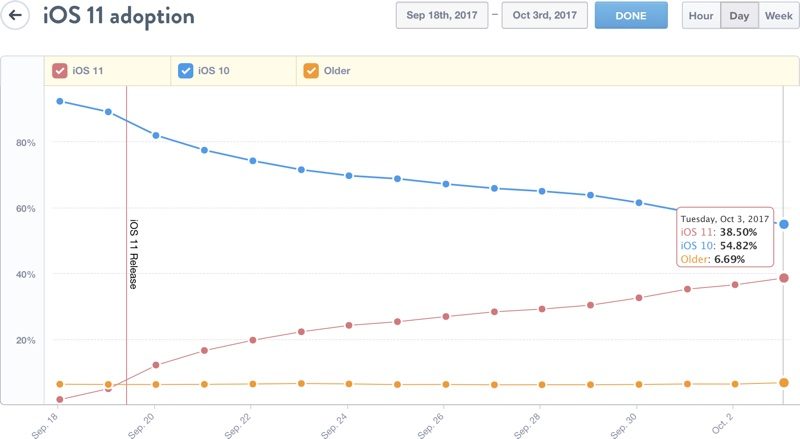

iOS 11 Adoption Hits 38.5% After Two Weeks Of Its Release


This follows an earlier report that revealed that iOS 11 managed 10% in the first 24 hours of its release. However it seems that iOS 11 is lagging behind its predecessors when it comes to adoption rates because iOS 10 back in 2016 managed to hit 48.16% in two weeks, which is almost half of all compatible iOS devices.


It is unclear why the adoption rate of iOS 11 is slower than previous iOS updates, but it has been previously speculated that Apple’s software QA could be to blame, as we’re seeing more instances of initial releases being more buggy than before, causing many users to hold off on updating until much later.


iOS 11 is no exception to this and there have been user reports of the update slowing down apps and more recently causing some pretty bad battery drain. However we expect Apple will address those issues in due time, but for now it appears to be hampering the initial rush to get the latest iOS update.


Source: ubergzigmo

Windows
Mac OS
iOS
Linux
3uTools
Win 64-bit For this device
V6.0.1 2024-12-18
Download
Win 32-bit For this device
V6.0.1 2024-12-18
Download
3uTools
Intel Chip How to Identify Chip Type
V6.0.1 2024-12-18
Download
Apple Silicon
V6.0.1 2024-12-18
Download
How to Identify Chip Type
1.  Click the Apple icon in the top-left corner of the screen and select About This Mac.
2.  Check the Processor or Chip field to determine if it is "Intel" or "Apple".
Please use the 3uTools PC client to install the iOS client:
1、 Install either the Windows or Mac version of 3uTools on your computer
2、 Open the PC client and connect your device to the computer via USB cable
3、 After the connection is successful, wait for the computer to automatically install the mobile app for the device, or locate “Install Mobile App” on the computer and manually click to install.
3uTools
deb file
V6.0.1 2024-12-18
Download
rpm file
V6.0.1 2024-12-18
Download
Windows
Windows
iOS
iOS
Android
Android
TV
TV
3uAirPlayer
Win 64-bit For this device
V6.0.1 2024-12-18
Download
Win 32-bit For this device
V6.0.1 2024-12-18
Download
iOS Device Mirroring (No App Required)
1、 Install 3uAirPlayer on the Windows PC
2、 Open Control Center and select Screen Mirroring
3、 From the list, choose your PC to start mirroring
4、 Or connect your iOS device to the PC via USB to begin mirroring
Scan to get "3uAirPlayer" App
3uAirPlayer TV V6.0.1
2024-12-18
TV System Requirements: Android 7.0 or later
Download the TV installation package, copy it to a USB drive, insert it into your TV or set-top box, then select the file from the home screen to install.




