NEWS

Apple Posts New ‘Shot on iPhone’ Ad Featuring Maple Leafs player Mitch Marner

04/11/2019

1896

Apple has shared a new "Shot on iPhone XS" video on its YouTube channel in the U.S. and Canada featuring Toronto Maple Leafs stars Auston Matthews and Mitch Marner, just in time for the start of the 2019 Stanley Cup Playoffs tonight. 


In the short clip, Matthews films a day in the life of Marner as the teammates travel, practice, greet fans, and more. 

The Maple Leafs are set to face the Boston Bruins in the first round of the 2019 Stanley Cup Playoffs on Thursday at 7:00 p.m. Eastern on NBCSN and CBC. The playoffs begin tonight with ten teams hitting the ice, including the President's Trophy winning Tampa Bay Lightning versus the Columbus Blue Jackets. 
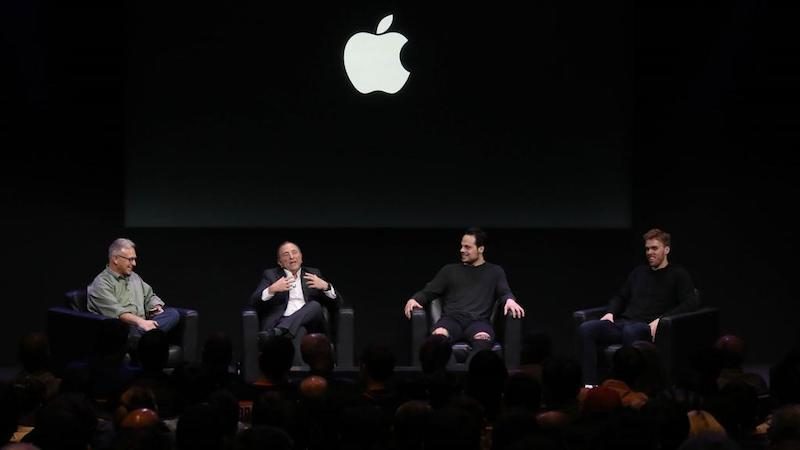

Apple Posts New ‘Shot on iPhone’ Ad Featuring Maple Leafs player Mitch Marner


Earlier this year, while in nearby San Jose for the 2019 NHL All-Star Game, Matthews joined NHL commissioner Gary Bettman, Edmonton Oilers star Connor McDavid, and Apple's marketing chief Phil Schiller
 at Apple's Infinite Loop campus to discuss how technology is improving the game of hockey


Source: macrumors

Windows
Mac OS
iOS
Linux
3uTools
Win 64-bit For this device
V6.0.1 2024-12-18
Download
Win 32-bit For this device
V6.0.1 2024-12-18
Download
3uTools
Intel Chip How to Identify Chip Type
V6.0.1 2024-12-18
Download
Apple Silicon
V6.0.1 2024-12-18
Download
How to Identify Chip Type
1.  Click the Apple icon in the top-left corner of the screen and select About This Mac.
2.  Check the Processor or Chip field to determine if it is "Intel" or "Apple".
Please use the 3uTools PC client to install the iOS client:
1、 Install either the Windows or Mac version of 3uTools on your computer
2、 Open the PC client and connect your device to the computer via USB cable
3、 After the connection is successful, wait for the computer to automatically install the mobile app for the device, or locate “Install Mobile App” on the computer and manually click to install.
3uTools
deb file
V6.0.1 2024-12-18
Download
rpm file
V6.0.1 2024-12-18
Download
Windows
Windows
iOS
iOS
Android
Android
TV
TV
3uAirPlayer
Win 64-bit For this device
V6.0.1 2024-12-18
Download
Win 32-bit For this device
V6.0.1 2024-12-18
Download
iOS Device Mirroring (No App Required)
1、 Install 3uAirPlayer on the Windows PC
2、 Open Control Center and select Screen Mirroring
3、 From the list, choose your PC to start mirroring
4、 Or connect your iOS device to the PC via USB to begin mirroring
Scan to get "3uAirPlayer" App
3uAirPlayer TV V6.0.1
2024-12-18
TV System Requirements: Android 7.0 or later
Download the TV installation package, copy it to a USB drive, insert it into your TV or set-top box, then select the file from the home screen to install.





