NEWS

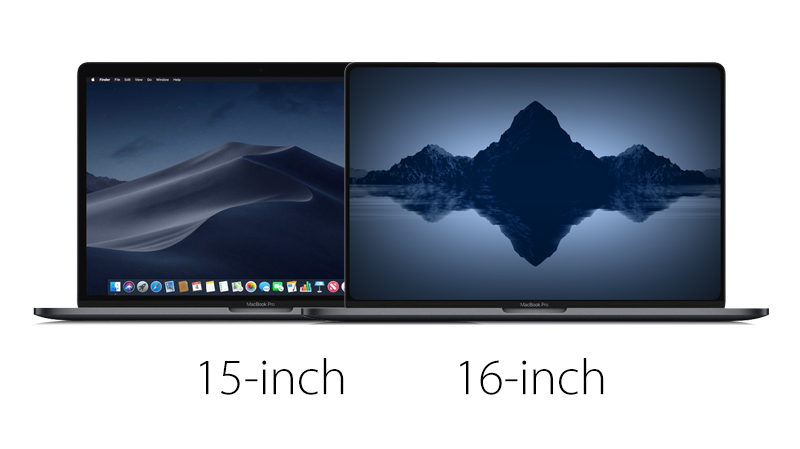
DigiTimes: 16-Inch MacBook Pro Will Feature Narrow Bezels and Launch in September

07/30/2019

1632

16-inch MacBook Pro rumors continue to surface, with hit-or-miss industry publication DigiTimes today reporting that the notebook will feature an "ultra-narrow bezel" design and launch in September. 
DigiTimes: 16-Inch MacBook Pro Will Feature Narrow Bezels and Launch in September
The report suggests that the narrow bezels will allow for the 16-inch MacBook Pro to be roughly the same overall size as the current 15-inch model. Taiwanese contract manufacturer Quanta Computer is expected to assemble the notebook, according to the unnamed supply chain sources cited. 

Multiple reports have claimed the 16-inch display will be supplied by LG and have a resolution of 3,072×1,920 pixels. 

Last week, analyst Ming-Chi Kuo said the 16-inch MacBook Pro will also feature a scissor mechanism keyboard, as Apple finally begins to transition away from its troubled butterfly mechanism keyboard design. 

16-inch MacBook Pro rumors are beginning to consolidate, but there are still a few conflicting details. This is the second report to mention a September release date, for example, but Apple typically unveils new Macs in October. Either way, it looks like the notebook is coming in the fall. 

Kuo believes the 13-inch and 15-inch MacBook Pro will live on with refreshes in 2020.


Source: MacRumors

Windows
Mac OS
iOS
Linux
3uTools
Win 64-bit For this device
V6.0.1 2024-12-18
Download
Win 32-bit For this device
V6.0.1 2024-12-18
Download
3uTools
Intel Chip How to Identify Chip Type
V6.0.1 2024-12-18
Download
Apple Silicon
V6.0.1 2024-12-18
Download
How to Identify Chip Type
1.  Click the Apple icon in the top-left corner of the screen and select About This Mac.
2.  Check the Processor or Chip field to determine if it is "Intel" or "Apple".
Please use the 3uTools PC client to install the iOS client:
1、 Install either the Windows or Mac version of 3uTools on your computer
2、 Open the PC client and connect your device to the computer via USB cable
3、 After the connection is successful, wait for the computer to automatically install the mobile app for the device, or locate “Install Mobile App” on the computer and manually click to install.
3uTools
deb file
V6.0.1 2024-12-18
Download
rpm file
V6.0.1 2024-12-18
Download
Windows
Windows
iOS
iOS
Android
Android
TV
TV
3uAirPlayer
Win 64-bit For this device
V6.0.1 2024-12-18
Download
Win 32-bit For this device
V6.0.1 2024-12-18
Download
iOS Device Mirroring (No App Required)
1、 Install 3uAirPlayer on the Windows PC
2、 Open Control Center and select Screen Mirroring
3、 From the list, choose your PC to start mirroring
4、 Or connect your iOS device to the PC via USB to begin mirroring
Scan to get "3uAirPlayer" App
3uAirPlayer TV V6.0.1
2024-12-18
TV System Requirements: Android 7.0 or later
Download the TV installation package, copy it to a USB drive, insert it into your TV or set-top box, then select the file from the home screen to install.




