 NEWS
NEWS
iPhone 8 May Be A Single Block, Without Any External Port
 11/21/2016
 2485
2485
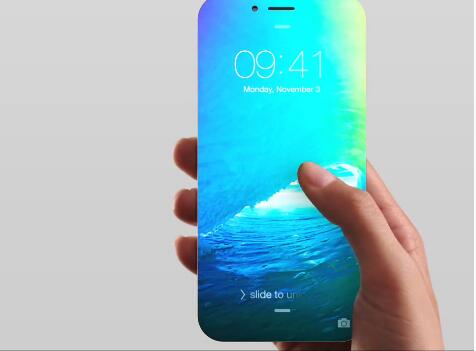
According to the forecast of Uproxx, the next year, Apple may introduce an iPhone with no doors on the outside. In addition to the lack of the jack input for the headphones, it would also remove the Lightning connector.
As we all know, this year Apple has decided to remove the input jack for the headphones in the iPhone 7. The issue has raised several discussions, but all in all users are getting used to this lack, perhaps also thanks to the special adaptor that comes directly from Apple.
Next year, the company from Cupertino could make a further step forward in this respect, by removing the port Lightning. For years the famous designer Apple – Jony Ive want a device with the front panel entirely dedicated to the display and without any external port. Definitely a neat design never seen on the market, which would make it the iPhone 8, a real jewel. Do you remember during the last Keynote the words of Ive:
“We believe in a future where all devices that interface with one another in wireless mode (i.e. without wires)”.
The various technologies needed to realize such a device should already be in the hands of Apple. The port Lightning could be replaced by wireless charging, which almost certainly will reach the iPhone next year. This does not implies, of course, a removal is a mandatory port Lightning, which in addition to providing energy to the device, allows you to connect a variety of accessories, specially products. With regard to the display edge-to-edge, Sharp already has excellent production techniques, and has already put on the market great OLED panels that could be exploited by Apple.
Finally, Apple has already presented the AirPods, a wireless headset in came in the next few months.
Without a doubt the choice to remove the audio jack was brave, and got an avalanche of criticism. To remove the door Lightning would be a catastrophe from the point of view of the critical but technologically speaking, it would lead to the creation of an innovative device, yet most of the Xiaomi Mi Mix because in this case you could have a smartphone in 100% display on the front.
Source:Bitfeed










