NEWS

Apple Updated Boot Camp to Solve MBP Speaker Problems

12/02/2016

2410

Apple has issued an update to Boot Camp drivers within Windows, preventing the random, loud pops from over-ranging and damaging the new MacBook Pro's speakers. However, the driver doesn't fix speakers already damaged by the problem.


It has confirmed that users who have installed Boot Camp since 1 p.m. Nov. 23 should already have the updated drivers. Older installations may require the user to manually run an Apple software update process from within the Windows installation.


Users with un-updated drivers could still experience a periodic loud pop out of proportion with the volume settings while booted into Windows. The loud pops are induced by an out-of-date Windows audio driver in Boot Camp.
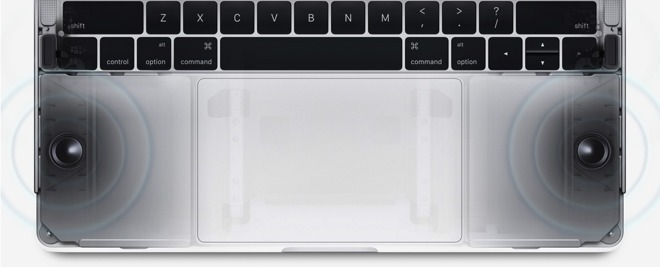
Apple Updated Boot Camp to Solve MBP Speaker Problems


Users who never booted into Windows through Boot Camp are not affected by the problem, nor are users running Parallels or other similar solutions.

Some users reported that MacBook Pro speakers were permanently damaged
 as a result of the pop over-ranging the hardware.


It was told by Apple to have users manifesting speaker damage that persists in macOS after exiting Windows contact Apple Care phone support to document the problem, and to make a Genius Bar appointment for assessment and rectification.


Source: appleinsider

Windows
Mac OS
iOS
Linux
3uTools
Win 64-bit For this device
V6.0.1 2024-12-18
Download
Win 32-bit For this device
V6.0.1 2024-12-18
Download
3uTools
Intel Chip How to Identify Chip Type
V6.0.1 2024-12-18
Download
Apple Silicon
V6.0.1 2024-12-18
Download
How to Identify Chip Type
1.  Click the Apple icon in the top-left corner of the screen and select About This Mac.
2.  Check the Processor or Chip field to determine if it is "Intel" or "Apple".
Please use the 3uTools PC client to install the iOS client:
1、 Install either the Windows or Mac version of 3uTools on your computer
2、 Open the PC client and connect your device to the computer via USB cable
3、 After the connection is successful, wait for the computer to automatically install the mobile app for the device, or locate “Install Mobile App” on the computer and manually click to install.
3uTools
deb file
V6.0.1 2024-12-18
Download
rpm file
V6.0.1 2024-12-18
Download
Windows
Windows
iOS
iOS
Android
Android
TV
TV
3uAirPlayer
Win 64-bit For this device
V6.0.1 2024-12-18
Download
Win 32-bit For this device
V6.0.1 2024-12-18
Download
iOS Device Mirroring (No App Required)
1、 Install 3uAirPlayer on the Windows PC
2、 Open Control Center and select Screen Mirroring
3、 From the list, choose your PC to start mirroring
4、 Or connect your iOS device to the PC via USB to begin mirroring
Scan to get "3uAirPlayer" App
3uAirPlayer TV V6.0.1
2024-12-18
TV System Requirements: Android 7.0 or later
Download the TV installation package, copy it to a USB drive, insert it into your TV or set-top box, then select the file from the home screen to install.




