 NEWS
NEWS
Apple's Accidental iPhone 'Leak' Delivers Bad News
 01/09/2017
 2320
2320
Love or hate Apple, nothing excites/incites smartphone fans as much as iPhone leaks. But the most recent - and seemingly most modest and credible - has just been disproved one week later upsetting a lot of iPhone fans in the process...
The source was seemingly infallible: the Beats By Dre Instagram account. And last week it caused a great deal of excitement after posting a photo which appeared to reveal a so-called ‘Jet White’ iPhone 7 alongside its Studio Wireless 3 headphones.
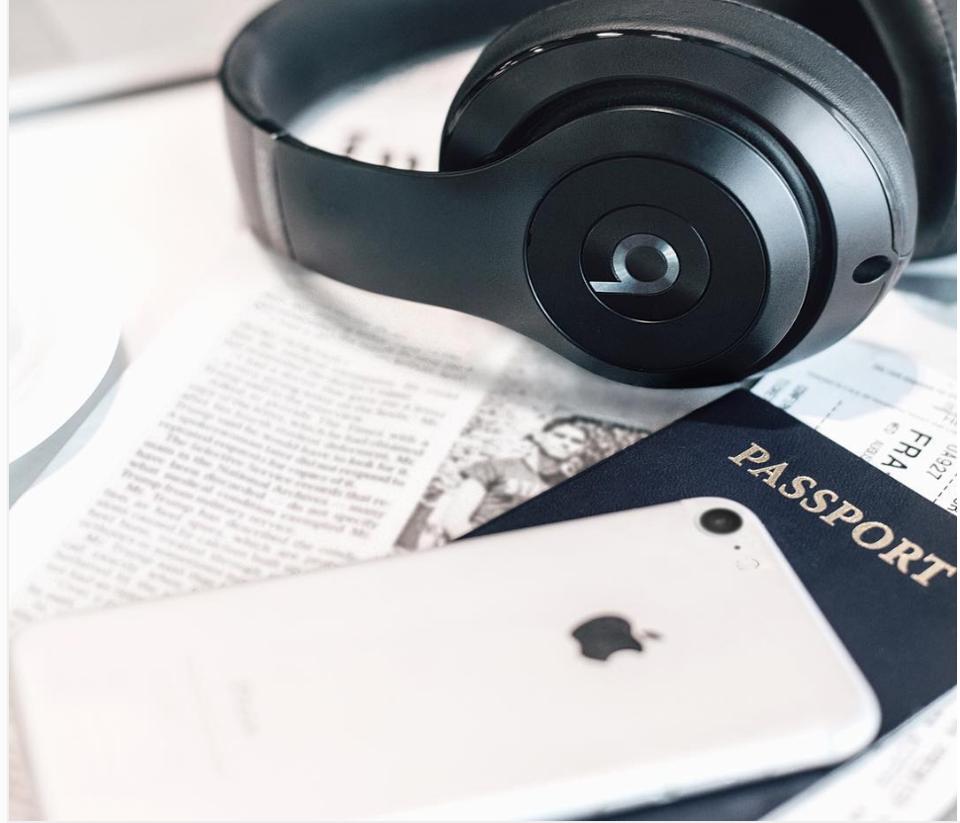
Furthermore the apparent ‘preview’ made perfect sense.
The iPhone 7 and iPhone 7 Plus are almost mid cycle and releasing a glossy white colour option during the traditional post-Christmas slowdown to accompany the popular Jet Black edition appears a smart move. Besides Apple is long associated with white products and, what seals the deal: Apple teasing it via its own headphone brand
But not so fast. Closer inspection revealed the new colour was merely the result of an Instragram filter in combination with the Tilt-shift feature. Furthermore you will spot from the rear camera that this is not an iPhone 7. Beats subsequently confirmed this, commenting: “The phone pictured is a silver iPhone 6.”
Bad news aside, why would Beats use an old iPhone 6 to illustrate its headphones rather than an iPhone 7? Because it is more photogenic. The iPhone 7 may have a much better camera, but to achieve that Apple had to substantially increase the size of the camera module creating a larger protrusion. That doesn’t look as good in photographs.
Then again if I were Apple, I would take this as a blessing in disguise.
After all potential customers have just shown how much they would appreciate a glossy white iPhone. Just don’t call it ‘Jet White’ as many users christened it, since that’s like calling it ‘Charcoal White’ and don’t make it as scratch prone as Jet Black because you could scratch that with heavy breathing.
In fact no user should buy Jet Black in the first place.
But come on Apple, take this ‘happy accident’ and give your customers what they want. You know it makes sense...
Source: Forbes










